

What's new — March 2026
Overview
Section titled “Overview”In March 2026 we released significant firmware and software updates for uMyo, including BLE connectivity via Android bridge, OTA firmware updates, multi-device simultaneous streaming, and a new web workbench. This page covers what’s new, how to get it, and what’s coming next.
If you received a device in the March 2026 batch, there’s a section below explaining which firmware your specific device shipped with.
What changed on March 19
Section titled “What changed on March 19”Since the initial March release, the following has landed:
- Multi-device BLE confirmed working — three uMyos streaming EMG + IMU + magnetometer simultaneously via a single Android phone
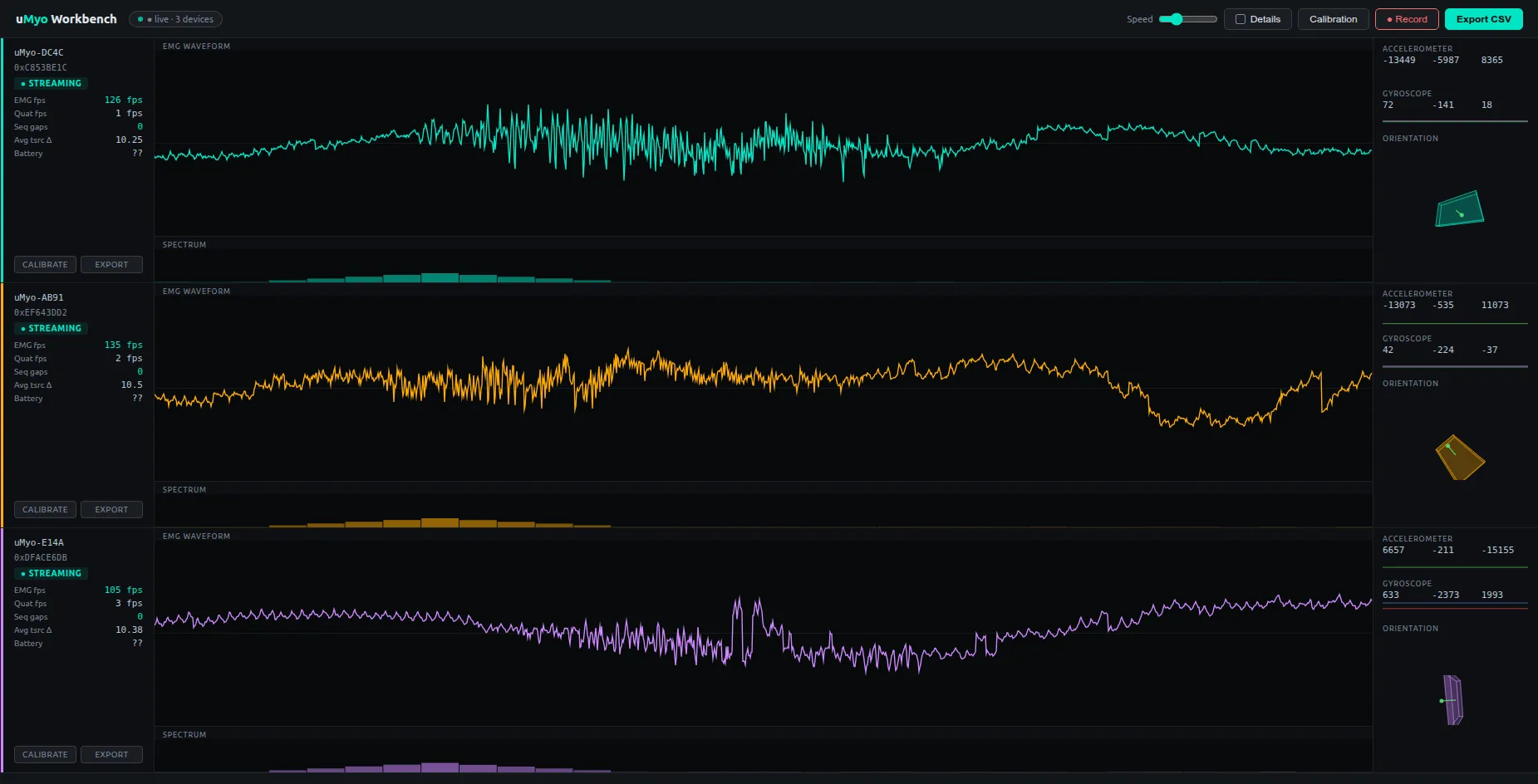
- New web workbench — replaces the pygame GUI with a browser-based interface (dark instrument theme, per-device waveform, spectrum, 3D orientation cube, sparklines)
- Persistent device naming — device names survive firmware updates and reconnects
- BLE scanner filtering — the Android app now ignores non-uMyo BLE devices, which fixes connection slot exhaustion in crowded RF environments
Known issues still being worked on: IMU fps drops under heavy EMG load (firmware fix in progress), IMU dropout under heavy RF congestion (same root cause, BLE scheduler — firmware fix next).
New capabilities
Section titled “New capabilities”Multi-device BLE streaming
Section titled “Multi-device BLE streaming”Three uMyos can now stream EMG, IMU, and magnetometer data simultaneously via a single Android phone. No USB base required.
Each device gets its own row in the workbench with independent waveform, spectrum, orientation, and metrics.
BLE connectivity via Android bridge
Section titled “BLE connectivity via Android bridge”uMyo streams data over Bluetooth LE to an Android phone, which forwards it to your PC over WiFi. This gives you real-time EMG, IMU, and magnetometer data in the workbench without a USB receiver base. Supports up to 6 simultaneous devices.
OTA firmware updates
Section titled “OTA firmware updates”Devices shipped with the updated bootloader can receive firmware updates wirelessly via the Android app. No programmer or USB connection required.
New web workbench
Section titled “New web workbench”A browser-based workbench replaces the previous pygame GUI. It runs a local Python WebSocket server (uf1_workbench_server.py) and opens automatically in your browser. Features per device:
- Real-time EMG waveform (auto-scaled, 2.5s buffer)
- Frequency spectrum
- 3D orientation cube (real quaternion from firmware)
- ACC/GYRO sparklines
- Metrics: EMG fps, QUAT fps, seq gaps, tsrc Δ, battery
- Calibration overlay
Persistent device naming
Section titled “Persistent device naming”Device names now persist across firmware updates and reconnects. The Android app re-sends the device name every 5 seconds after first data, so names survive brief disconnects. The name cache is MAC-keyed.
ESP32 and BLE advertisement mode
Section titled “ESP32 and BLE advertisement mode”BLE advertisement mode still works. When uMyo is in BLE mode but no phone is connected, it broadcasts standard BLE advertisement packets containing spectrum and quaternion data in the manufacturer-specific field — the same format as before. ESP32 and other BLE scanners can receive these as usual.
When the Android app connects, the device switches to GATT streaming automatically. When the app disconnects, advertisement resumes.
Note: advertisement packets include spectrum/FFT summary and QUAT data, but not raw EMG samples. For raw EMG over BLE, a GATT connection is required.
Which firmware does my device have?
Section titled “Which firmware does my device have?”Check the shipping notification email — the date and carrier tell you which firmware your device has.
fw-base — shipped via DHL on or around March 10
- Stable firmware with new magnetometer support and memory improvements
- Works with nRF24 and USB base station modes
- No BLE transport, no OTA capability
- To update: requires SWD programmer — contact us via Discord or email and we’ll help
fw-ble — shipped via DHL on or around March 13
- BLE transport: raw EMG + full workbench mode via Android bridge
- Original bootloader — no OTA capability yet
- Can be upgraded to OTA capability with a one-time SWD flash of the new bootloader — after that, all future updates are wireless
fw-ble-ota — shipped via Ukrposhta on or around March 13–14
- BLE transport + OTA-capable bootloader
- Firmware updates wirelessly via Android app
- Most capable configuration
Not sure which firmware you have, or need help upgrading? Join our Discord or email us.
Platform support
Section titled “Platform support”| Platform | Status |
|---|---|
| Android (BLE bridge + OTA) | ✅ Working |
| USB receiver base | ✅ Working |
| Arduino / ESP32 (nRF24 or BLE) | ✅ Working |
| Raspberry Pi | 🔄 Planned next |
| Windows / Linux / Mac direct BLE | 🔄 Planned |
| iPhone / iOS | 🔄 Planned |
Getting started with the Android bridge
Section titled “Getting started with the Android bridge”Requirements
Section titled “Requirements”- Android phone (Android 8.0+). On Android 11+, Location permission and Location toggle must be ON for BLE scan.
- PC and phone on the same WiFi network
- uMyo with fw-ble or fw-ble-ota firmware
- Run
uf1_workbench_server.pyon PC first (uf1-tools) - Make sure your phone and PC are on the same WiFi network. Download the APK from the v0.2.0 release, install it, open the app, go to the Streaming screen and enter your PC’s IP address and port (default:
26750). - Power on uMyo with a short button press. You’ll see a start sequence of colored flashes — wait for it to finish (ends with the turquoise muscle activity LED turning on). After that, a short press will show 3 blinks indicating the current radio mode: pink = nRF24, green = base, blue = BLE. Keep short pressing until you get 3 blue blinks. If you have multiple uMyos, repeat for each one.
- Tap Scan for Devices and wait for all your devices to appear in the list, then go to the Streaming screen and tap Start Streaming. If a device loses its name or disconnects, tap Disconnect on it — the scan will find it again. If it doesn’t come back after a few tries, turn it off and on again with a short press, then scan again.
How to update firmware via OTA
Section titled “How to update firmware via OTA”Requires fw-ble-ota (OTA-capable bootloader)
- Enable Bluetooth and Location on your phone, open the app.
- Enter your PC IP and port if not already set.
- Make sure the device is off. Press and hold the button — the LED will turn solid blue (instead of the normal start sequence). Keep holding for 5+ seconds until the LED switches to a slow blue blink. The device is now in bootloader mode.
- Short press the button once — this switches the bootloader from base to BLE mode (no LED change, this is expected).
- Tap Start OTA (asset) in the app — it will scan and connect automatically.
- The upload takes approximately 4–5 minutes. You’ll see packet progress in the app as it runs. Do not close the app or turn off uMyo during upload.
What’s coming next
Section titled “What’s coming next”- Firmware fix: IMU fps stability under heavy EMG load (BLE scheduler rate-limiting)
- Rename UI in Android app
- Export CSV from workbench
- Raspberry Pi support
- In-app firmware file picker for OTA
- Viewer mode in Android app
- Direct BLE support on Windows / Linux / Mac
- iOS support
- F-Droid release, then Play Store
Questions?
Section titled “Questions?”Join our Discord — we’re active there and most questions get answered the same day.